
Having a Yelp business page can be a great way to increase visibility and attract new customers. However, there may come a time when you decide you no longer want or need a Yelp presence. Deleting a Yelp business account is not as straightforward as simply clicking a “delete” button. Yelp does not allow business accounts to be easily removed.
There are a few reasons why Yelp makes it challenging to learn how to delete a Yelp business account:
- Yelp wants to maintain a robust business directory with accurate information. If it were easy to delete pages, the directory would become less valuable.
- Yelp relies on user-generated content. If businesses could easily remove their listings, they might do so to hide negative reviews.
- Deleting accounts goes against Yelp’s mission to connect consumers with local businesses. They want to keep business information available.
While you cannot simply delete your Yelp page, you have a few options to accomplish the same thing. This guide will discuss two main approaches:
The Official Yelp Account Closure Process
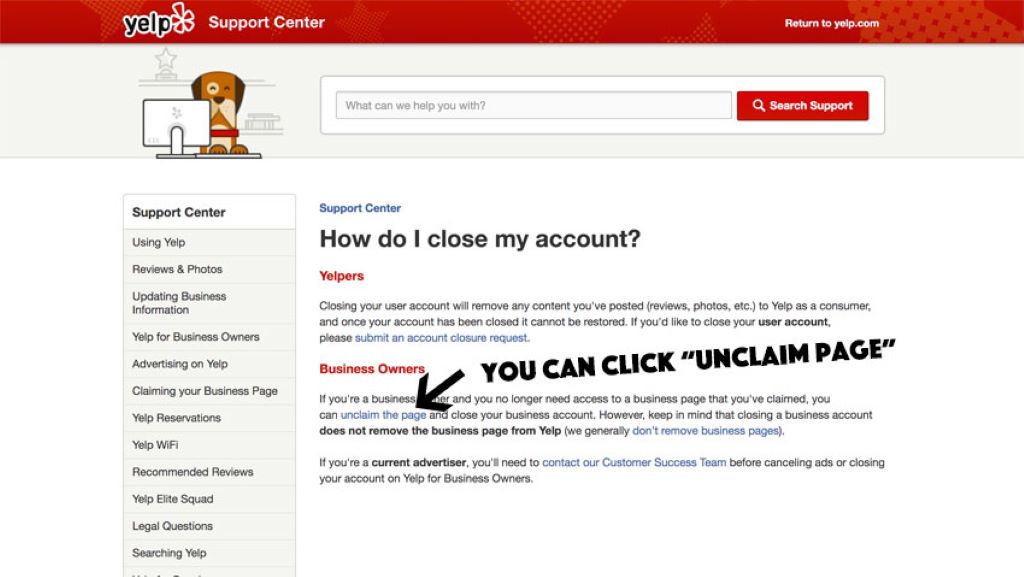
Yelp does provide an official process for closing business accounts. It involves submitting a request and waiting for their team to review it.
Here are the steps to formally close your Yelp business account:
1. Log in to your Yelp for Business Account
- Go to biz.yelp.com and log in using your business email and password.
- If you don’t already have a Yelp for Business account, you must create one before proceeding.
2. Visit the Account Closure Request Form
- Once logged in, click your business name in the top right corner to access the account menu.
- Select “Request Account Closure” from the dropdown menu. This will open the account closure request form.
3. Submit the Request Form
- You must provide your business name, the associated Yelp page you want removed, and a reason for requesting closure on the request form.
- Explain why you want to close your Yelp account. Select common reasons from a dropdown menu or write a custom reason.
- Be sure to use your official business email when submitting the request.
- Double-check that all information entered is accurate before submitting.
4. Wait for Yelp to Review the Request
- After submitting the closure request, you’ll receive an automated email confirmation from Yelp.
- Yelp states that their team reviews requests in the order received. Expect it to take at least 2-3 weeks for them to get back to you.
- There is no guarantee your request will be approved. Yelp reviews requests on a case-by-case basis.
- If they need additional information, Yelp will contact the business email on file before making a final decision.
5. If Approved, the Listing Is Removed
- If your account closure is approved after review, Yelp will send you confirmation via email.
- They will then proceed to delete the business listing and all associated information.
- The Yelp page will message that the account has been closed at the business’s request.
- Yelp reserves the right to re-open closed accounts if they receive updated business information.
This is the only official way to close a Yelp business account voluntarily. While Yelp does not make it quick and easy, following its formal process is recommended over questionable alternatives.
Alternative Routes Some Businesses Pursue
Because Yelp makes account closure difficult, some business owners pursue other methods besides the official process. However, it’s essential to avoid unethical or deceptive tactics. Here are some alternatives businesses try, along with concerns to keep in mind:
Claiming the Listing and Making Changes
- You can claim an unclaimed Yelp listing and gain admin access to make changes.
- However, Yelp monitors for suspicious activity and quickly reverses unauthorized changes.
- Making misleading edits to hide negative reviews can also lead to penalties.
Repeatedly Flagging the Listing
- Some business owners or reputation management companies try flagging their listing, hoping it gets removed.
- However, Yelp is unlikely to remove a legitimate business page just because it receives flags, and this tactic rarely works.
Filing Fake Reviews to Trigger Yelp’s Review Filter
- Inundating your page with fake 5-star reviews can activate Yelp’s review filter and suppress all reviews.
- But this violates Yelp’s terms of service, risks account suspension and is unethical.
Reporting Competitors for Violations
- Businesses should not file false complaints about competitors to try getting their Yelp pages removed.
- Falsely reporting another business can lead to legal issues.
Purchasing Advertising as Leverage
- Some businesses try to buy ads in exchange for deleting or editing their Yelp page.
- However, Yelp states that sponsored placements will not influence content decisions.
As you can see, trying to force Yelp to remove your listing through shady methods is not recommended. While frustrating, the best approach is to make a polite and reasonable account closure request through official channels.
5 Key Factors Yelp Considers When Closing Accounts
Yelp does not approve all requests to close business accounts. Their team reviews each case individually. Here are five factors that likely impact their decisions:
1. Reason for Closure Request
Yelp probably considers into consideration the reason for wanting to close an account. For example, going out of business or no longer operating in a particular region may be viewed more favorably than simply being unhappy with reviews. Providing a thoughtful explanation can help.
2. History of Policy Violations
Accounts linked to terms of service violations, like fake reviews or deceitful edits, are less likely to be closed. Violations indicate the business cannot be trusted to manage its Yelp presence responsibly. Avoid policy violations if possible.
3. Advertising and User Engagement
Active advertising and users frequently engaging with the listing (reviews, photos, etc) may make Yelp less inclined to close it. This signals it provides value to consumers. Lack of engagement improves chances for closure.
4. Amount of Legitimate Reviews
Listings with more real reviews tend to be kept open. Yelp wants to preserve content that helps consumers, even if some reviews are negative. Listings with only a few reviews are more accessible to part with.
5. Public Value of the Content
Ultimately, Yelp makes decisions based on whether the listing offers helpful information to consumers. More valuable public content decreases the likelihood of removal. Focus on improving the listing rather than removing it.
These key considerations can help manage expectations when requesting voluntary account closure.
What to Do If Your Closure Request is Denied
Receiving confirmation that Yelp has denied your account closure request can be frustrating. But there are still a few options to explore:
Make Another Closure Request
If your initial request is rejected, you can submit another closure request after some time has passed – perhaps six months later. Circumstances may have changed enough to alter the outcome. Just don’t make excessive repeat requests.
Edit Business Details
If completely removing the listing seems unlikely, try editing the business information instead. You can update the name, category, hours, photos, and more according to your current situation, allowing you to shape the listing.
Respond Professionally to Reviews
Address any negative reviews or feedback through your public responses. Providing thoughtful replies demonstrates your business cares about making customers happy. This can improve sentiment over time.
Focus on Reputation Management
Work on building a solid reputation by encouraging positive reviews, resolving customer complaints, and highlighting your strengths across the web and social media. More robust brand perception can overcome negative reviews.
Claim and Optimize the Listing
If you haven’t already, officially claim the Yelp page and take full advantage of free optimization tools. Feature critical services, share photos, promote offers, and keep information updated to put your best foot forward.
With some additional effort, you can regain control over how your business is portrayed on Yelp, even without deleting the listing entirely.
Recommendations for Businesses Considering Closing Yelp Accounts

For business owners thinking about requesting Yelp account closure, here are some recommendations:
Only Close Legitimate Accounts
Never use deceptive means to close competitors’ pages or inauthentic accounts – this can spur legal action. Only submit requests for your own verified business listings.
Understand Yelp’s Position
While the inability to easily remove listings is frustrating, try to see it from Yelp’s perspective. They believe preserving public content benefits consumers. Work within their guidelines.
Make a Strong Case
Provide a clear, reasonable explanation for wanting closure, such as how circumstances changed, mistakes made previously, or goals for the future. A thoughtful request has a better chance.
Use Official Channels Properly
Only submit account closure requests through Yelp’s direct process. Avoid questionable methods like fake reviews or flagging content. These will likely backfire.
Be Patient
Give Yelp time to assess your request properly – up to a month. Avoid repeatedly contacting them and asking for updates during the review period.
Consider Alternatives
Weigh options like optimizing the listing or pivoting focus to reputation management before closing your account. In many cases, deletion may not be necessary.
Move On If Unsuccessful
If your request is denied, redirect your efforts toward building an excellent reputation. Closure is not the only path forward.
Focus on Customer Satisfaction
Provide excellent products/services and positive customer experiences. Even mediocre brands can succeed this way.
Closing a Yelp account is undoubtedly an option, but not the only one. Consider all angles before choosing the best path for your business.
Frequently Asked Questions
Can I delete my Yelp business listing myself?
No, there is no self-service option to remove or delete your help business page. You must submit an official account closure request and go through Yelp’s review process.
What happens to my reviews if I close my Yelp account?
If Yelp approves closing your account, all reviews associated with the listing will be removed and no longer visible. However, reviews may remain publicly visible if the closure request is denied.
Does deleting a Yelp account remove it from Google searches?
Closing a Yelp account does not necessarily remove the listing from Google. The Google index may still display cached snapshots of the page for some time. Complete removal from search takes patience.
Can someone else delete my business listing on Yelp?
No. Only an authorized business representative can submit an account closure request. Yelp will not remove accounts based on requests from third parties.
What if Yelp refuses to close my business account?
If your request is denied, focus on reputation management and optimizing the existing listing. Build up positive reviews over time to diminish the impact of any negative ones.
Conclusion
Deleting a Yelp business account entirely is challenging by design. Yelp aims to maintain robust listings to connect consumers and businesses. While frustrating for some owners, their position makes sense for the good of their directory.
Properly use Yelp’s official process when closure seems like the only option. Avoid questionable shortcuts that violate policies. And remember – closure requests often get denied, so have backup plans ready just in case.
Tags: account deactivation steps, business account closure, business online presence management, business profile removal, digital footprint reduction, internet privacy, online reputation management, Yelp account deletion, Yelp business guide, Yelp profile tips



Leave a Reply